~/Library/Containers/com.apple.mail/Data/Library/Application Support/Mail/Stationery/Apple/Contents/Resources/Custom/Contents/Resources
Sunday, February 16, 2014
The path to Apple Mail templates...
In case you want to edit them directly.

Thursday, February 6, 2014
Fixing Gmail/IMAP with Apple Mail on Maverick
Email from my GMail account was showing up slowly and sporadically in Apple Mail under Maverick. Fix kudos to this post by TPIRMan:
I fixed this problem by going to my Gmail Settings > Labels and unchecking the "Show in IMAP" checkbox next to "All Mail."
Saturday, August 18, 2012
Media Button Router to the rescue...
After upgrading my SamSung Galaxy SII to Android 4, the play/stereo button on my car stereo quit having the desired effect while streaming audio from Listen over bluetooth.
Thanks to this post, I found Media Button Router. Installed it, configured it to send all media controls to Listen, and it just works. Even seems more reliable than before.
Thanks to this post, I found Media Button Router. Installed it, configured it to send all media controls to Listen, and it just works. Even seems more reliable than before.
Saturday, June 11, 2011
"setup.py test" throwing "ValueError: Empty module name"
Running 'setup.py test' suddenly started throwing a ValueError:
Which turns out to be caused by a Emacs autosave file. I had unsaved changes in my Emacs buffer. Once I saved them, the autosave file went away and 'setup.py test' ran fine.
Obviously some deeper problem here with setup.py tripping over these files.
$ /usr/bin/python ./setup.py testPoking around with pdb, it turns out it was because the name argument to loadTestsFromName():
running test
running egg_info
writing pyVBox.egg-info/PKG-INFO
writing top-level names to pyVBox.egg-info/top_level.txt
writing dependency_links to pyVBox.egg-info/dependency_links.txt
reading manifest file 'pyVBox.egg-info/SOURCES.txt'
writing manifest file 'pyVBox.egg-info/SOURCES.txt'
running build_ext
Traceback (most recent call last):
File "./setup.py", line 17, in
url = "http://github.com/von/pyVBox"
...snip...
File "/System/Library/Frameworks/Python.framework/Versions/2.6/lib/python2.6/unittest.py", line 576, in loadTestsFromName
module = __import__('.'.join(parts_copy))
ValueError: Empty module name
(Pdb) print parts_copy
['test', '', '#VirtualMachineTests']
(Pdb) print name
test..#VirtualMachineTests
Which turns out to be caused by a Emacs autosave file. I had unsaved changes in my Emacs buffer. Once I saved them, the autosave file went away and 'setup.py test' ran fine.
Obviously some deeper problem here with setup.py tripping over these files.
Wednesday, April 6, 2011
Apple Mail losing all state
Seen this scenario a couple of times:
- Mac crashes
- Reboot and when Mail starts up, it's lost all of it's state and wants me to re-enter all my accounts information.
Saturday, March 12, 2011
Adding a Tomato router as a Wifi extender
I recently moved into a house with a finished basement, which really puts a crimp into my ability to run cat5 ethernet where I want it. So, I needed some wifi extension and the ability to support some devices without wifi capability.
Since I'm using a Tomato router which supports WDS, I decided to add a second router and use WDS to turn it into an extender and a wired-to-wireless bridge.
I bought another Cisco/Linksys WRT54GL and installed Tomato 1.28. I basically did what I did last time, with a couple tweaks:
That's it - pretty darn easy. I've ordered a third WRT54GL to add a third repeater which I'll chain to the second to add another wired-to-wireless bridge. I expect that to go smoothly and will post when I've finished that.
Update 3/15: Added a third router, chained to the second and all is working well.
Since I'm using a Tomato router which supports WDS, I decided to add a second router and use WDS to turn it into an extender and a wired-to-wireless bridge.
I bought another Cisco/Linksys WRT54GL and installed Tomato 1.28. I basically did what I did last time, with a couple tweaks:
- I downloaded and unpacked the Tomato firmware.
- Since my home LAN is not the default network (192.168.1.0) I was able to connect my laptop to the new router via an ethernet cable and communicate with it directly without having it connected to the rest of my LAN. If you are using 192.168.1.0 for your LAN, you can do the same but you'll probably need to swap back and forth by turning your airport interface on and off, and disconnecting the ethernet cable.
- I skipped the factory reset and just did the upgrade. All went smoothly.
- After changing the password, under Basic/Identification I changed the router name and under Administration I changed the color scheme.
- I then followed the directions in the Tomato FAQ to set up WDS on both routers. The only hitch I had here is initially tried to use "WPA/WPA2 Personal" and "TKIP/AES" instead of "WPA Personal" and "AES" as the FAQ suggests and I couldn't get that to work. Following the directions exactly and things worked fine.
That's it - pretty darn easy. I've ordered a third WRT54GL to add a third repeater which I'll chain to the second to add another wired-to-wireless bridge. I expect that to go smoothly and will post when I've finished that.
Update 3/15: Added a third router, chained to the second and all is working well.
Monday, October 25, 2010
Fix stuck install on Android
Application updated and got stuck on "Installing..." - I couldn't cancel, reinstall, etc.
What worked for me was to follow the advice on this page and Uninstall Updates for the Market app (#1 on the page).
What worked for me was to follow the advice on this page and Uninstall Updates for the Market app (#1 on the page).
Saturday, October 23, 2010
Migrating from hg to git
So I had some stuff hosted by Google code using mercurial, but I mainly use git and I found going back and forth distracting, so I decided to move over to git. To do this I basically followed the guidance from this post and used the fast-export utility.
Thursday, August 19, 2010
git: Pushing a new branch back to an origin
OK, I know this is straight forward git stuff, but I just couldn't find a clear example anywhere. I cloned a remote git repository, created a new local branch and then wanted to push that branch back to the original remote repository (without merging it first).
First, I cloned a remote repository, e.g.:
git clone git@github.com:von/sandbox.git
Then I created a new branch locally and make changes in that branch:
cd sandbox
git checkout -b new-branch
edit && commit
Now I pushed the new branch back to the remote repository (i.e. origin) without merging it into the main branch (i.e. master). To do this, while on new-branch, just do a git push origin HEAD, i.e.:
git checkout new-branch
git push origin HEAD
Basically you are saying push to origin the current HEAD.
Saturday, March 13, 2010
Thursday, February 18, 2010
Mapping control-click to right click in Windows VM on a Mac host
Problem: emulating a right click/control click in a Windows VM on a Mac host with Mac's one-button trackpad.
Quick work around: You can put two fingers on trackpad and click to simulate right click.
Cleaner solution as suggested by Muffin Research Labs is to use AutoHotKey to enable use of control-click to emulate right-click:
- Download and install AutoHotKey.
- Right click on contrl-left-remap.ahk and save to Windows VM.
- Double click on contrl-left-remap.ahk, while it will appear nothing happens you should now be able to control-click on things and Windows should behave like you right-clicked (e.g. you'll get the context menu if you click on a file).
- To have this persist past a reboot, copy contrl-left-remap.ahk to C:/Program Files/All Users/Start Menu/Programs/Startup
Friday, February 5, 2010
How to change title of Google site page
If you create a page in a Google site and then decide you need to change the title of the page (i.e. the <title> element), there doesn't seem to be a straight forward way to do it. Here's what I found:
- Click on More Actions/Page Settings
- Select Show Page Title and Save
- Now select Edit Page
- The title of the page should be at the very top, simply edit it to what you want it to be.
- Save the page.
- The title should now be changed.
- Disable Show Page Title under More Actions/Page Settings.
Saturday, January 23, 2010
Backing up my Delicious bookmarks
I use Delicious for all my web bookmarks. I like it because it lets me tag bookmarks, write notes about them, and also access them easily from all my browsers and computers. Bookmarking pages to Delicious is easy thanks to an add-on for Firefox and a bookmarklet for other browsers.
While I've never had a problem with Delicious, like all services in the cloud, I do like to make a personal backup of my data. Deilcious makes this easy with a nice HTTP API. So I wrote a python script to pull down all my bookmarks as a xml file. I just run it as a cron job every night and it makes copy of all my bookmarks. This way if Delicious ever drops off the face of the earth, it may take some work, but I know I can reconstruct all my data.
Sunday, November 29, 2009
VirtualBox Harmony remote programming disconnects
Trying to program my Harmony remote from WinXP inside of VirtualBox, I kept getting disconnect errors. Poking around, I found these directions (last four paragraphs of the post) for setting up a filter in the virtual machine configuration so that it automatically connects the USB device (the problem apparently is the remote disconnects when rebooting and without the filter, the virtual machine can't find it then).
Sunday, November 8, 2009
Roku N1000 and Linksys EZXS55W equals network woes
Updated 3/13/2010: I've become convince the Linksys in question was just flakey and this was nothing specific to the Roku.
Long story short, looks like it just didn't get along with the Linksys EZXS55W 5-port switch I had there. Switch seems to work fine with everything else, so I just swapped it with another switch (different Linksys) and all was good.
Saturday, October 31, 2009
Using git with a cvs repository
Edited 11/29/2009: Even better than the below, use git-cvs.
My situation: Developing for a software project that uses a CVS repository, but I really want to use git because I do a lot of development off-line and hate waiting until I get back online to commit (it's a pain to separate different commits and I forget what I did and why).
Poking around the web I found a couple of good blog posts (linked to at points in this post where I found them useful) on how to use git locally for a cvs repository. I weaved them together and here's what worked for me.
Prerequisite Software
First you need to have the appropriate software installed:
Make sure you have git-core package with cvsimport functionality:
Make sure cvsps is installed, which it wasn't in my case:
And then I found it:
Overview
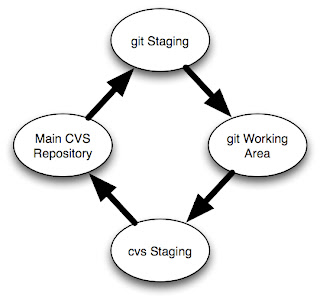
The image at right shows how the structure works. You start with your main cvs repository. You import this into a git staging repository. You don't do any work in the staging repository, it exists solely for importing from git.
You will then clone the staging repository into a working git repository where you will do all your development.
Then you'll have another cvs checkout of the main cvs repository. This is were you will integrate your changes made in your git repository back into cvs.
Kudos to Takis Blog for much of the mechanisms here, but note that this blog post is somewhat dated and the command syntax has changed (e.g. 'git-cvs-import' is now 'git cvs-import').
Set up
Make the git staging repository ("staging.git") and import the CVS repository (which for the sake of this post I'll call 'repo'):
If changes are checked into CVS, pull them into your git staging area by doing the following (the same command you used to create it in the first place).
Start by making sure your cvs staging repository is up to date:
When you are done, mark the last commit you exported with a tag:
Don't forget to unset the GITDIR environment variable when you are done:
That should do it. I'm sure I'll update this post as I refine the process.
Update 11/1: Fixed typo with 'setenv GITDIR' command. Added CVS-LAST-EXPORT tag. Fixed '-p x' to '-p -x' options with 'git cvsimport'.
Update 11/3: Added '-a' to 'git cvsimport' and note about '-c' to cvsexportcommit.
My situation: Developing for a software project that uses a CVS repository, but I really want to use git because I do a lot of development off-line and hate waiting until I get back online to commit (it's a pain to separate different commits and I forget what I did and why).
Poking around the web I found a couple of good blog posts (linked to at points in this post where I found them useful) on how to use git locally for a cvs repository. I weaved them together and here's what worked for me.
Prerequisite Software
First you need to have the appropriate software installed:
Make sure you have git-core package with cvsimport functionality:
% git help -a | grep cvsimport
cvsimport           merge-recursive     status
Make sure cvsps is installed, which it wasn't in my case:
% cvsps
cvsps: Command not found.
% sudo port install cvspsAnd then I found it:
% rehash
% cvsps
Can't open CVS/Repository: No such file or directory
Overview

The image at right shows how the structure works. You start with your main cvs repository. You import this into a git staging repository. You don't do any work in the staging repository, it exists solely for importing from git.
You will then clone the staging repository into a working git repository where you will do all your development.
Then you'll have another cvs checkout of the main cvs repository. This is were you will integrate your changes made in your git repository back into cvs.
Kudos to Takis Blog for much of the mechanisms here, but note that this blog post is somewhat dated and the command syntax has changed (e.g. 'git-cvs-import' is now 'git cvs-import').
Set up
Make the git staging repository ("staging.git") and import the CVS repository (which for the sake of this post I'll call 'repo'):
% mkdir staging.git
% cd staging.git
% git cvsimport -p -x -v -d $CVSROOT repo
% git tag CVS-LAST-EXPORT% cd ..
% git clone -l staging.git repo.git
% cd ..
% cvs checkout -d staging.cvs repo
If changes are checked into CVS, pull them into your git staging area by doing the following (the same command you used to create it in the first place).
% cd staging.git
% git cvsimport -a -p -x -v -d $CVSROOT foo% cd ../repo.git
% git pull# edit files
% git commit -a
Start by making sure your cvs staging repository is up to date:
% cd ../staging.cvs
% cvs updateOptionally you can add '-c' after "cvsexportcommit" and it will automatically commit for you if the change looks good.% setenv GIT_DIR ../repo.git/.git
% git log CVS-LAST-EXPORT..
# For each git commit id, execute the following
% git cvsexportcommit 547f3018a8f951dcc4187e5f171b337bfbad1883
# The last line of the above comment, will be a 'cvs commit' which you will execute:
% cvs commit -F .msg 'README'
When you are done, mark the last commit you exported with a tag:
% git tag CVS-LAST-EXPORTDon't forget to unset the GITDIR environment variable when you are done:
% unsetenv GIT_DIRThat should do it. I'm sure I'll update this post as I refine the process.
Update 11/1: Fixed typo with 'setenv GITDIR' command. Added CVS-LAST-EXPORT tag. Fixed '-p x' to '-p -x' options with 'git cvsimport'.
Update 11/3: Added '-a' to 'git cvsimport' and note about '-c' to cvsexportcommit.
Tuning in Digital Cable (QAM) channels on TivoHD
Just got a TivoHD. I know that Comcast in my area puts out digital channels (using what is called QAM) and the Tivo supposedly could tune them in, but it wasn't at all clear to me how to get the Tivo to do that. Here's how.
I'm not sure if there is anyway to have Tivo ignore the channels with no content. Plan to keep poking around with that.
Update: If you go toTiVo Central, Messages and Settings, Settings, Channels, Channel List you can mark which digital channels you receive. Once you have done that, under the Guide Options, leave Channel at "Chans You Receive" and then you will just see the channels you get.
- Go to TiVo Central, Messages and Settings, Settings, Channels, Channel Scan.
- Select "Scan for channels" and settle in for 10-15 minutes. In my case it was half way through before it even found any channels, but it ended up finding 200+!
- After it was done, I went back to Live TV and looked for my new channels, but couldn't find any but the ones I had before. Hmmm...
- Ah, select "Guide" and then press Enter to bring up the Guide Options. (Update: see end of post for what is probably a better approach than this.
- For "Channels" select "All"
- Now you should see a bunch of new digital channels (they'll look like "12-1") in the Guide as well as when you surf through the channels.
- There is no show information for any of the digital channels.
- Most (90%+!) of the digital channels seem to have no actual content, I just see a grey screen.
I'm not sure if there is anyway to have Tivo ignore the channels with no content. Plan to keep poking around with that.
Update: If you go toTiVo Central, Messages and Settings, Settings, Channels, Channel List you can mark which digital channels you receive. Once you have done that, under the Guide Options, leave Channel at "Chans You Receive" and then you will just see the channels you get.
Tuesday, October 27, 2009
Adding source code formatting to Blogger
I used this greasemonkey script. Definitely a little clumsy as you need to edit your Blogger template and install greasemonkey.
TweetDeck install and 3003 error
Update 11/23: Trying again with the 0.31.3 TweetDeck release, it installs fine. Shrug...
I'm trying to install TweekDeck on my Mac and I keep getting a 3003 error.
I turned on logging of the application install:
% touch ~/.airappinstall.log
And the full log follows.
The obvious line is the exception about "Directory can't be written to" - but what directory? /Applications? Well, it is actually writing /Applications/Tweekdeck.app but that applications isn't executable:
[Updated 10/27 to include link to Adobe KB article on logging.]
I'm trying to install TweekDeck on my Mac and I keep getting a 3003 error.
I turned on logging of the application install:
% touch ~/.airappinstall.log
And the full log follows.
% cat .airappinstall.log
waiting to receive open event
UI SWF load is complete
UI initialized
enter waitingForOpen
Unpackaging to /private/var/folders/t6/t6puj+oYFsmrOCU8+6+IHU+++TM/TemporaryItems/FlashTmp1
unpackaging is complete
application is bound to side-by-side version 1.0
application is bound to this version of the runtime
app id TweetDeckFast
pub id FFF259DC0CE2657847BBB4AFF0E62062EFC56543.1
Application not located
Waiting for user confirmation
User confirmed action: install
creating native installer in: /private/var/folders/t6/t6puj+oYFsmrOCU8+6+IHU+++TM/TemporaryItems/FlashTmp2
native installer creation complete
Starting install
Destination for installed application is /Applications
stateInstalling: [ErrorEvent type="error" bubbles=false cancelable=false eventPhase=2 text="Unhandled exception Error: Directory can't be written to" errorID=5006]
stateInstallingWithElevation: enter install
stateInstallingWithElevation: /Library/Frameworks/Adobe AIR.framework/Versions/1.0/Adobe AIR Application Installer -runtime /Library/Frameworks -silent -logToStdout -url -location /Applications -desktopShortcut -programMenu file:///private/tmp/TweetDeck_0_30.0.air
subinstaller: Starting silent app install of file:///private/tmp/TweetDeck_0_30.0.air
subinstaller: UI SWF load is complete
subinstaller: UI initialized
subinstaller: Unpackaging to /private/var/folders/zz/zzzivhrRnAmviuee+++++++++++/TemporaryItems/FlashTmp0
subinstaller: unpackaging is complete
subinstaller: application is bound to side-by-side version 1.0
subinstaller: application is bound to this version of the runtime
subinstaller: app id TweetDeckFast
subinstaller: pub id FFF259DC0CE2657847BBB4AFF0E62062EFC56543.1
subinstaller: Application not located
subinstaller: creating native installer in: /private/var/folders/zz/zzzivhrRnAmviuee+++++++++++/TemporaryItems/FlashTmp1
subinstaller: native installer creation complete
subinstaller: Starting install
subinstaller: Destination for installed application is /Applications
subinstaller: Beginning install
subinstaller: Copying /private/var/folders/zz/zzzivhrRnAmviuee+++++++++++/TemporaryItems/FlashTmp1/Template to /Applications/TweetDeck.app
subinstaller: chown of /Applications/TweetDeck.app completed with status 0
subinstaller: Execution complete; beginning commit phase
subinstaller: Commit complete
subinstaller: starting cleanup of temporary files
subinstaller: application installer exiting
received unknown message type from subinstaller: done
Failed during elevated install: 3003
starting cleanup of temporary files
application installer exiting
The obvious line is the exception about "Directory can't be written to" - but what directory? /Applications? Well, it is actually writing /Applications/Tweekdeck.app but that applications isn't executable:
% open /Applications/TweetDeck.app/
LSOpenFromURLSpec() failed with error -10661 for the file /Applications/TweetDeck.app.
[Updated 10/27 to include link to Adobe KB article on logging.]
Sunday, October 18, 2009
Google Docs folder sharing and my iPhone
One of the the things that has constantly annoyed me about my iPhone is that Safari is lousy at remembering my passwords. And I tend to use long, random passwords, which means they are (1) hard to enter on the iPhone pseudo keyboard and (2) hard for me to remember. Most of the time on my laptop, I keep my passwords in KeePass and cut'n'paste them into whatever application needs them (and yes, I think this is more secure than trying to memorize all the hundred+ passwords I have, but that's another post).
And yes, there are similar applications to KeePass for the iPhone, but I don't know any good way to sync my KeePass database with them.
One of the things I really like to do on my iPhone is access a set of recipes I have in Google docs. But inevitably my login session has timed out, so I have to go back to my laptop, get my Google password and type it in. By the time I do all that, it's easier just to have used my laptop in the first place.
However, when Google added the feature of sharing whole folders, a solution popped into my head: create a Google account just to use on my iPhone, give it a password I can actually remember, and then share my recipes with that account.
Why not just give my main Google account a password I can remember? Well, because I actually have stuff accessible by that account I care about, so I want a strong password on it. But since my new iPhone Google account only has access to stuff I share with it, and most of that is read-only, if that password is guessed, the ramifications are much less.
And yes, there are similar applications to KeePass for the iPhone, but I don't know any good way to sync my KeePass database with them.
One of the things I really like to do on my iPhone is access a set of recipes I have in Google docs. But inevitably my login session has timed out, so I have to go back to my laptop, get my Google password and type it in. By the time I do all that, it's easier just to have used my laptop in the first place.
However, when Google added the feature of sharing whole folders, a solution popped into my head: create a Google account just to use on my iPhone, give it a password I can actually remember, and then share my recipes with that account.
Why not just give my main Google account a password I can remember? Well, because I actually have stuff accessible by that account I care about, so I want a strong password on it. But since my new iPhone Google account only has access to stuff I share with it, and most of that is read-only, if that password is guessed, the ramifications are much less.
Subscribe to:
Posts (Atom)